Managing CPP, OAS, Employment Insurance, and the Canadian Dental Care Plan is done through My Service Canada Account (MSCA). However, most people struggle to sign in because there are multiple ways to sign in, and you must use the correct method. This guide addresses this concern, how to sign up, the various security methods, and what users run into.
Quick Answer: My Service Canada Account is accessible through one of three registration methods. These are online banking, GCKey, or Alberta/BC online banking. First, sign up using the identity authentication method. Then, set up your sign-in with multi-factor authentication. Always remember to use the same method each time you sign in.
What Is My Service Canada Account?
My Service Canada Account (MSCA) is an Employment and Social Development Canada service portal. Using MSCA gives you access to the following:
-
Canada Pension Plan (CPP)
-
Old Age Security (OAS)
-
Employment Insurance (EI)
-
The Canadian Dental Care Plan
-
Canada Disability Benefit
-
Social Insurance Number (SIN)
-
Student Loans, including Canada Apprentice Loan
-
Debt Statements
The My Service Canada Account is not CRA My Account. The services and programs listed above are not part of CRA My Account. For taxes and CRA services (e.g., Canada Child Benefit) and tax forms (e.g., T4/T5), use CRA My Account.
It is not the same thing as CRA My Account. My Service Canada Account covers the programs above. CRA My Account covers your taxes and CRA-run benefits like the Canada Child Benefit. Even tax slips such as your T4 or T5 live in CRA My Account, not here. If you’re not sure which one you need, our comparison of My Service Canada Account vs CRA My Account explains the difference, and our CRA My Account 2026 guide covers the CRA side.
For changing your direct deposit, mailing address or phone number, the government has a separate Change your personal information page that lays out your options.
How to Register for My Service Canada Account
Creating an account is a one-time job. A few ground rules first:
-
You must be at least 12 years old.
-
You can only create and use the account as yourself. The government says no one is authorized to create or use an account on your behalf.
You can start on the official Create a My Service Canada Account page. Here’s how it works.
Step 1: Choose a Sign-In Option
|
Sign-in option |
Use with |
Good to know |
|---|---|---|
|
Interac Sign-In Partner |
Online banking |
Compatible with many major Canadian banks, including RBC, TD, BMO, CIBC, Scotiabank, National Bank, Desjardins, Tangerine, Simplii, ATB, Vancity, and Wealthsimple. If your bank is not supported, choose another sign-in option. |
|
GCKey |
Government of Canada account services |
A good option if you do not wish to use your online banking credentials. GCKey can be created during account registration. |
|
Provincial sign-in |
Alberta.ca Account or BC Services Card |
This method is only for Alberta and British Columbia users. |
Step 2: Have Your ID Ready
You need your Social Insurance Number (SIN). If you don’t have one, you can provide a Birth Registration Number or a Unique Client Identifier (UCI).
Step 3: Verify Your Identity
If you use one of the provincial sign-in methods, your identity is not verified here. If you choose another method, you can use:
-
Interac online verification service: Through your participating bank or credit union, such as BMO, CIBC, Desjardins, National Bank, RBC, Scotiabank, or TD.
-
SIN application number: The number you receive after applying for your SIN online.
-
Personal Access Code (PAC): A 7-digit code requested from Service Canada. This code may already have been sent to you if you previously applied for CPP or OAS.
Step 4: Set Up Multi-Factor Authentication
The last part of account creation is security. Multi-factor authentication helps protect your account and is explained below.
Signing In and the Error Most Users Make
Most people struggle here. You need to use the sign-in method you used to create your account and profile. The government requires users to sign in with that same option each time. Changing sign-in methods means registering for the new method.
For example, if you created an account and registered using your bank several years ago and you try GCKey now, you will not be able to find your account.
If you do not remember how you created your account, try recalling your initial sign-in. Did you use the sign-in option provided by your bank, or did you create a GCKey username and password?
Ways to Troubleshoot Common Sign-In Issues
I Don’t Know Which Sign-In Method I Used
Try to remember how you first accessed the service. Was it using online banking? That is the Interac Sign-In Partner. Was it through your username and password for a federal service? That is GCKey.
If you are in British Columbia or Alberta, it is your Alberta.ca Account or BC Services Card. Still stuck? Give the Registration and Authentication Help Desk a call. The contact details are listed below.
I Forgot My GCKey Username or Password
The first step is to use the “Forgot your username?” option on the GCKey sign-in page. If you have an email for account recovery, they will send you your username.
For your password, select “Forgot your password?”, provide your username, and follow the password reset instructions. This option is available if you have a recovery email or the security questions you set up to verify your identity.
Without a recovery email, forgetting both your username and password may mean starting from scratch and creating a new GCKey. The system will most likely ask you to register for MSCA again.
My GCKey Was Revoked
A revoked GCKey cannot be recovered and must be set up again. This usually happens when the credentials are compromised. Your options include creating a different sign-in method or setting up a new GCKey.
I Changed Banks, and My Interac Sign-In Partner Has Stopped Working
Changing your bank usually means that you may need to update your sign-in partner as well.
The “Switch My Sign-In Partner” feature on the Sign-In Partner page is an easy way to accomplish this.
My Security Code Is Locking Me Out
Give the Registration and Authentication Help Desk a call for assistance.
-
Toll-free in Canada: 1-866-279-5238, between 8:30 a.m. and 4:30 p.m. local time, Monday to Friday.
-
Outside Canada: 1-506-548-7009, from 8:00 a.m. to 8:30 p.m. Atlantic Time, Monday to Friday. Long-distance charges may apply.
It may take a while to get through, so have your account details ready before calling.
There Is a Problem With the Display or Page Load
Please confirm that:
-
Cookies and JavaScript are enabled.
-
Browser auto-translation is turned off.
-
You are not signing in from a bookmarked post-login page.
-
Your browser is compatible with the website.
Protecting Your Account
According to government advisories, follow these guidelines to protect your information:
-
Always watch your surroundings. Never type or provide security codes or passwords while you are out in public.
-
Always keep your passwords and security codes confidential and never share them with anyone.
-
Log out and close your browser after every use.
-
If you spot any unusual activity, change your password immediately.
The government advisories state that Service Canada will not ask you for personal information, including passwords, via email or SMS. Never reply to any message or email if you think it has come from Service Canada. Delete suspicious messages and make sure the web address you are browsing ends in canada.ca.
Take a look at our article on benefitspulsehub.com .
If you are having issues with your CRA My Account, please refer to our guide on benefitspulsehub.com .
Getting Started: Getting What You Need Done
People usually log in for a particular reason, and we’ve collected the most popular guides here:
-
Applying for OAS: A step-by-step guide on How to Apply for Old Age Security in 2026.
-
Applying for GIS: A checklist of everything you’ll need for your GIS Application Checklist.
-
CPP retirement planning: Check your CPP Retirement Pension Eligibility 2026.
-
CPP Disability Benefits: Learn how to apply for and appeal a claim with our guide to the CPP Disability Benefit.
-
The Canada Disability Benefit: Read about the Canada Disability Benefit.
-
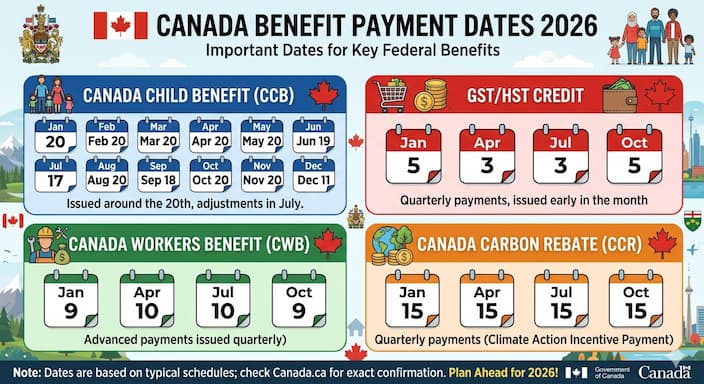
Payment schedules: Check the CPP Payment Dates 2026 and the Canada Benefit Payment Dates 2026 calendar.
How to Contact Service Canada for Program Questions
For general account questions or concerns related to a specific program, you will find contact information on each program’s page on the My Service Canada Account portal on Canada.ca.
This includes the Canadian Dental Care Plan, EI, CPP, OAS, the Canada Disability Benefit, and the Social Insurance Number.
If you need further assistance or information on other topics, you may reach out by dialing 1-800-O-Canada.
Conclusion
For me, the sign-in issues were usually user errors, such as trying to sign in using a method I hadn’t registered with or losing or forgetting information such as GCKey.
It takes a couple of minutes to learn the ropes of using My Service Canada Account and setting up the account, but the hassle saved in the future is well worth it. Registering and having a solid backup plan, such as keeping recovery information safe and setting up a backup security method, will likely stop you from running into many of the problems listed in this article.
Frequently Asked Questions
What Is My Service Canada Account (MSCA)?
My Service Canada Account (MSCA) is an online portal through which Employment and Social Development Canada allows users to access and manage information regarding services like the Canada Pension Plan, Old Age Security, Employment Insurance, the Canadian Dental Care Plan, the Canada Disability Benefit, and their Social Insurance Number.
How Can I Create an My Service Canada Account?
Visit the official canada.ca . There are several methods to choose from when registering. You can use an Interac Sign-In Partner, a GCKey, or sign in through a provincial option. Enter your Social Insurance Number and complete the verification and security processes. The account is available to people aged 12 and above.
What Sign-In Options Do I Have With My Service Canada Account?
There are several sign-in methods available, including using your bank credentials via Interac Sign-In Partner, a GCKey, or an account with one of the provinces if you live in Alberta or British Columbia. Make sure you use the method you originally used to register for your MSCA.
Are My Service Canada Account and CRA My Account the Same?
No. They are two completely different accounts. My Service Canada Account focuses on managing things like the Canada Pension Plan, Old Age Security, and Employment Insurance, whereas CRA My Account covers your taxes, tax slips, and CRA benefit programs.
Read our comparison of benefitspulsehub.com for more details.
What Are the Common Sign-In Issues With My Service Canada Account?
The most common issues stem from people using a sign-in method that was not used during the original account registration process. Other problems include forgetting a GCKey password, having a revoked GCKey, changing the bank used to sign in, or getting locked out at the security code stage.
How Do I Reset My GCKey?
To reset your GCKey, use the GCKey sign-in page and select “Forgot your password?” Follow the instructions to reset your password using your recovery email or security questions. If your GCKey has been revoked, it cannot be recovered, and you will need to create a new one.
This article is for informational purposes only. Sign-in options, contact details, and security procedures may change. Confirm the latest information on the official My Service Canada Account website.
Stay updated with the latest Canadian government benefits, payment dates, and CRA news — explore more guides at benefitspulsehub.com