
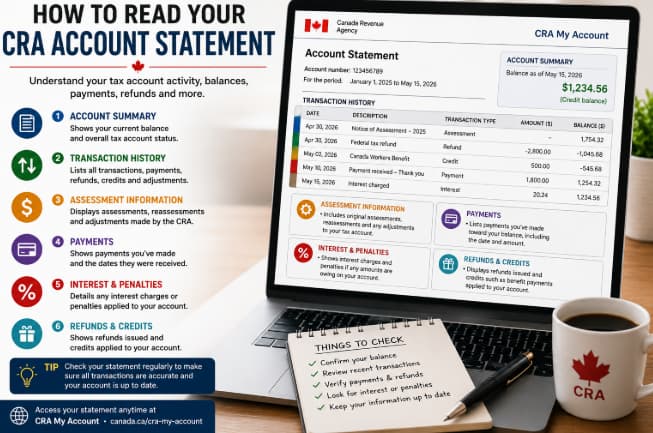
Understanding how to read your CRA Account Statement is a key part of taking care of your taxes in Canada. Whether you’re checking your tax balance, double-checking a payment, or scanning your refund story, your Canada Revenue Agency (CRA) Account Statement gives a detailed log of what happened on your tax file.
For many taxpayers, the statement can feel a bit confusing at first. It includes different transaction codes, balances, payment entries, interest amounts, and adjustments that might not make sense right away. But once you learn how to interpret those details, you can better sidestep errors, spot any remaining balances, and make sure your tax information stays correct.
In this guide, we’ll walk through each section of your CRA Account Statement, explain what the various transactions stand for, show you how to confirm you made the payment, and point out where you can look for more details using CRA My Account.
What Is a CRA Account Statement?
A CRA Account Statement is an official overview of the things that happened on your tax account. It lays out transactions tied to your income tax account, including assessments, payments, refunds, interest, credits, and any balance that still remains.
Compared to your Notice of Assessment (NOA), which talks about the outcome of a particular tax return, an Account Statement shows a more continuing record of financial movement linked to your account. It is not just one moment, it keeps going.
Depending on how your taxes are set up, the statement may show things like:
- Tax assessments
- Payments you received
- Refunds that were issued
- Interest charges
- Penalties
- Credits that were applied
- Adjustments
- Outstanding balances
Looking at your statement on a regular basis can help you remain aware of your tax responsibilities and spot matters that could need action.
Where Can You Find Your CRA Account Statement?
The simplest way to get your Account Statement is through CRA My Account.
Once you sign in, you can view details such as:
- Account balances
- Payment history
- Notices of Assessment
- Tax returns
- Benefit payments
- Direct deposit information
Paper statements may also be available in certain situations, but most taxpayers now access their tax records online.
If you’re unfamiliar with the CRA online portal, read our guide on My Service Canada Account vs CRA My Account to understand the different services each account provides.
Why Is Your CRA Account Statement Important?
Your Account Statement works as your official record of tax account activity, so it’s not just a casual summary.
Reviewing it on a regular basis helps you:
- Confirm payments were received
- Verify refund amounts
- Monitor interest charges
- Check outstanding balances
- Identify adjustments made by the CRA
- Detect possible errors early
Keeping track of your statement can also help when applying for loans, preparing future tax returns, or resolving questions tied to earlier tax years.
How to Read Your CRA Account Statement: Understanding the Main Sections of Your CRA Account Statement
Even if the layout feels a bit different depending on how you open it, most CRA Account Statements tend to have a few usual parts in them.
- Account Summary
The Account Summary gives a rapid overview of your tax account, basically.
It usually contains:
- Current account balance
- Amount owing or a credit balance
- Recent transactions
- Payment due details
This part helps you see right away where your tax position stands.
If what you see is a negative number, it can mean the CRA owes you money. A positive balance, in contrast, generally tells you that you still owe taxes or other amounts.
- Transaction History
The Transaction History shows each financial event tied to your tax account.
For example:
- Tax return assessments
- Payments that were received
- Refunds that were issued
- Interest that was charged
- Credits that were applied
- Reassessments
- Adjustments
Each item is normally shown in time order, so it’s easier to follow how things shift as months pass.
Reviewing this section regularly can help make sure those expected payments and credits are logged the way they should be, because sometimes timing is weird and you do want it clear.
- Assessment Information
Each time the CRA processes, or reassesses your tax return, a transaction usually shows up on your statement.
In this section you might notice things like
- Original assessment
- Reassessment
- Tax adjustments
- Refund calculations
- Balance changes
Checking those entries against your Notice of Assessment can help you grasp why your account balance moved, even when it feels random at first.
If you are waiting for your return to be assessed, you can also check our article called CRA Processing Times for Tax Returns (2026) which may help with expected processing timelines.
How to Read Your Account Balance
One of the main parts of your statement is your current account balance.
In general, you may see one of these outcomes.
Balance Owing
If your statement has a balance owing, it means you still owe money to the CRA.
That balance may include
- Income tax
- Interest, Penalties, Previous balances
Paying outstanding amounts promptly can help reduce extra interest charges . If you wait, the CRA may add interest, and sometimes penalties, depending on your exact situation
Credit Balance
A credit balance usually means the CRA has received more money than what you owe right now.
This might happen because of: tax overpayments, refund adjustments, tax credits, or instalment payments
Depending on your case the CRA may issue a refund or it may use the credit toward future taxes. You may see this reflected as a lower owing amount on your next statement, sometimes it looks like nothing changed at first
How to Read Your CRA Account Statement: Understanding interest charges
Lots of taxpayers are genuinely surprised to see interest show up on their statements
Interest might be added when:
- Taxes stay unpaid after the due date
- Previous balances stay outstanding
- Some reassessments increase taxes owing
Interest charges can keep going until the full outstanding balance is paid. That is why reviewing your statement regularly matters, because it helps you see how interest affects your account balance over time
To learn how interest and penalties are worked out, take a look at our guide on What Happens If You File Your Taxes Late in Canada (2026).
How Payments Show Up on Your Statement
Each payment the CRA receives is generally added to your statement.
Payment records can show things like:
- Online banking payments
- Direct payments
- Instalment payments
- Refund transfers
- Credit adjustments
After you make a payment, it is worth checking your statement just to make sure the transaction actually got attached the right way.
Why Your Balance Can Move Around
Sometimes people notice their balance going up or down when they were not expecting it.
This can happen for a few usual reasons, for example:
- Interest added
- A new tax assessment
- Reassessments
- Refund changes
- Applied tax credits
- Payment processing
If you review your transaction history you will typically see the explanation for the balance shift.
Understanding refund transactions
If the CRA decides you paid more taxes than you actually owed, your Account Statement might end up showing a refund transaction.
In most cases, the refund section will include things like:
- refund amount
- issue date
- payment method (direct deposit or cheque)
- related tax year
If you’re waiting for your refund, check out our guide on CRA Processing Times for Tax Returns (2026) to understand when you may receive your payment.
How to read payment transactions
Every time you make a payment toward your tax account, it should show up in your transaction history.
Common payment types include:
- online banking payments
- debit card payments
- pre-authorized debit payments
- instalment payments
Payments made through financial institutions
For each transaction your statement usually shows :
- Payment date
- Payment amount
- Description
- Updated account balance
If you recently made a payment, please allow enough processing time before expecting it to show up on your statement.
How to Read Your CRA Account Statement: What do adjustments and reassessments mean?
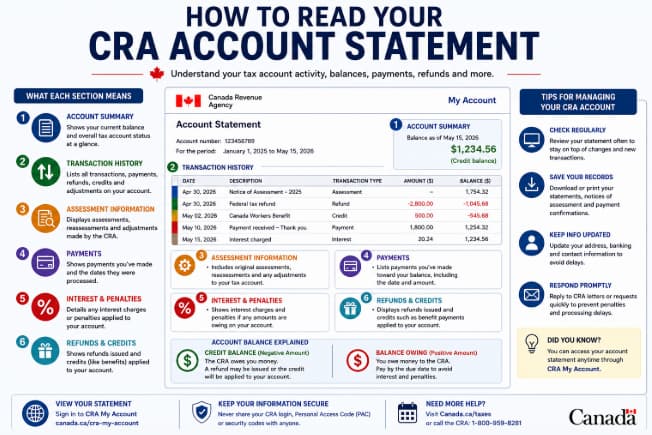
Sometimes the CRA updates your tax account after reviewing new details or fixing a mistake. These updates are called adjustments or reassessments, and it can feel a bit confusing at first.
Common reasons for a reassessment can include:
- Fixing reported income
- Revisiting tax credits
- Adding tax slips that were missing
- Processing an amended tax return
- Applying newly approved deductions
If your account was reassessed, compare the changes with your Notice of Reassessment, so you can understand why your balance went up or went down.
How to Read Your CRA Account Statement: Understanding penalties and interest
If penalties or interest apply to your account they will usually appear as separate transactions, not merged with your main payment.
You might see charges for :
- Late filing penalties
- Interest on taxes that are still unpaid
- Instalment interest charges
- Other charges that may apply
Reading these bits carefully helps you get a sense of why your balance moved, and how much of your overall amount owing connects to penalties or interest.
How to Notice Errors on Your CRA Account Statement
Even if CRA records are usually very accurate, it still helps to check your statement from time to time.
Look for things like:
- Payments that never show up
- Refund amounts that don’t look right
- Transactions that appear more than once
- Personal details that are wrong, for example your name or address
- Unexpected interest charges
- Balances that do not match what you have on your side
If you spot inconsistencies, compare your Account Statement with your payment confirmations , your tax return, and your Notice of Assessment before you reach out to the CRA.
Tips for Keeping Control of Your CRA Account
Reviewing your statement is only one part of managing your tax account well.
Here a few best practices , you know, just to keep things moving smoothly.
Sign In Regularly
Check your CRA My Account now and then , especially to catch new transactions, and any notices that pop up.
Save Important Documents
Make downloads or print out copies of things like:
- Notices of Assessment
- Account Statements
- Payment confirmations
- Tax slips
When your records are organized , filing taxes later becomes way easier.
Keep Personal Information Updated
Tell the CRA if anything changes, such as:
- Address
- Marital status
- Banking information
- Direct deposit details
When details stay current , it helps prevent delays in refunds , and delays in benefit payments too.
Respond to CRA Notices Promptly
If the CRA asks for extra information , responding quickly can reduce the chance of delays , and it may also help avoid additional interest charges.
Frequently Asked Questions
Is a CRA Account Statement the same as a Notice of Assessment?
No. A Notice of Assessment shows the outcome of a particular tax return. A CRA Account Statement , instead, is an ongoing set of records with transactions, balances, payments, and adjustments on your tax account.
How often should I check my CRA Account Statement?
It’s usually a good idea to review your statement a few times during the year, especially after you file your return, when you make a payment, or after you get a refund, just to see what moved and why.
Why does my account balance keep changing?
Your balance can change because of a few things, for example payments, refunds, reassessments, interest amounts, penalties, or other corrections that the CRA processes. Even small adjustments can shift the number.
Can I download my CRA Account Statement?
Yes. Most people can view and download their Account Statement through CRA My Account.
What should I do if I notice a mistake?
First, check your tax records, and also your payment confirmations. If everything still looks wrong, then contact the CRA so they can explain what happened, or help you sort it out.
Final Thoughts
Figure out how to read your CRA Account Statement and you gain more grip on your tax details, while also staying aware of what’s happening with your finances. Once you know what the account balances mean, what your transaction history shows, where refunds appear, and which payments were applied, you can spot interest charges and any reassessments sooner. That way you are able to notice problems fast and keep your tax files precise.
When you check things regularly in CRA My Account, it becomes easier to watch for refunds, confirm payments, and react quickly to any changes from the CRA. Whether you’re preparing your annual income tax return or you’re managing leftover balances, looking over your Account Statement is a useful habit that helps you avoid unpleasant surprises and maintain solid financial records.

Pingback: How to Pay CRA Online in 2026: Complete Payment Guide
Pingback: CRA Installment Payments Explained (2026 Complete Guide)
Pingback: CRA Tax Instalments Guide (2026): Complete Payment Guide